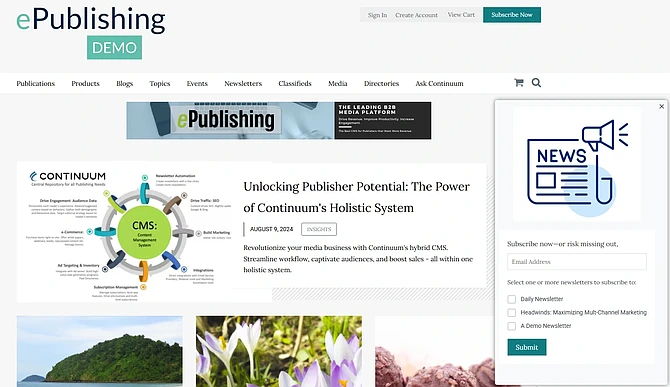
Continuum now provides the capability to configure and display an Editorial Content Area as a pop-up message that allows your readers to opt into your Free newsletters without going through the entire registration form.
With this new pop-up newsletter feature, Continuum makes it easier than ever to grow your audience, understand engagement, and integrate with the tools you’re already using. Enable it today to start turning more visitors into loyal subscribers.
This means you can capture more newsletter signups without interrupting the user experience!
Seamless Integration with MailChimp and Multipub
This new feature is integrated with MailChimp and Multipub. When a website visitor opts in to receive a newsletter, their information is automatically sent to MailChimp. For clients who use Continuum and Multipub, the newsletter opt-in is directed to the Multipub system, enabling Multipub clients to better understand their on-site audience engagement.
Here’s how to set up a pop-up site messaging for your website:
1. Understand Pop-Up Capabilities:
Continuum allows you to configure and display either an Editorial Content Area or a pop-up message. These can be used to encourage readers to opt into your free newsletters and are integrated with MailChimp and Multipub.
2. Create a Pop-Up for Free Newsletter Sign-ups:
For detailed instructions on how to enable users to opt into free newsletters without creating an account, refer to this article
3. Trigger a Pop-Up Editorial Content Area:
To learn how to trigger a pop-up of an Editorial Content Area, check out this post in the Knowledge Base:
4. Implement the Short Code for Free Newsletter Sign-ups:
To display a Free Newsletter signup Editorial Content area, paste the following short code into the code view of your Editorial Content Area:
Below is a sample of the pop-up that is viewable from our demo site. Of course, you can use your own images and messaging.
Update to User Manager
Track your users who are signed up for a FREE newsletter using the Continuum user manager.
User Manager describing the area to use when filtering for users who have opted into a Free newsletter.
Using the “Opted into a Newsletter with an email only and have created free newsletter account” slider, you can toggle on the filter. This will provide you with a list of users who are FREE newsletter subscribers with an email address only.